
DocumentationSyntax of PowerCoach Command Description | DokumentationSyntax of PowerCoach Command Description | DocumentationSyntax of PowerCoach Command Description |
 |  |
 |
• To execute a Keyboard Command, you must type a key.
In this documentation, the respective symbols for Special keys or Common keys are used to describe Keyboard Commands, for examples:
[A] ...means "Type A key".
[RET] ...means "Type RETURN key".
[<-] ...means "Type LEFT ARROW key".
• To execute a Mouse Command, you act on objects using the mouse.
In this documentation, the respective symbols for Mouse actions are used to describe Mouse Commands:
[*] ...means "Execute a CLICK".
[**] ...means "Execute a DOUBLE CLICK".
[R*] ...means "Execute a RIGHT CLICK" on Windows computers.
...means "Execute a CONTROL CLICK" on Mac OS computers.
• To execute some commands, you must activate or deactivate SHIFT LOCK.
In this documentation, the [LOC] symbol is used if a command requires activated SHIFT LOCK, for examples:
[LOC] + [*] ...means "Execute a CLICK" when "SHIFT LOCK is activated".
[LOC] + [->] ...means "Type RIGHT ARROW key" when "SHIFT LOCK is activated".
[LOC] + [UP] ...means "Type UP ARROW key" when "SHIFT LOCK is activated".
NOTE: If a command requires activated SHIFT LOCK, the [LOC] symbol is the first element of the command description (separated of Key or Mouse symbol by the "+" sign).
• To execute certain commands, you must simultaneously press and hold down one or several Modifier keys while typing a key or executing a mouse action.
In this documentation, the respective symbols for Modifier keys are used if a command requires such keys, for examples:
[SHI] + [*] ...means "Execute a CLICK" while you "hold down SHIFT key".
[LOC] [SHI] + [*] ...means "Execute a CLICK" when "SHIFT LOCK is activated" and while you "hold down SHIFT key".
[CTR] [SHI] + [RET] ...means "Type RETURN key" while you "hold down CTRL key" and "hold down SHIFT key" on Windows computers.
...means "Type RETURN key" while you "hold down COMMAND key" and "hold down SHIFT key" on Mac OS computers.
NOTE: Symbols for Modifier keys are listed at the beginning of command descriptions (after the [LOC] symbol and separated of Key or Mouse symbol by the "+" sign).
• To execute certain commands, you may use optional Multipliers.
In this documentation, the [MULT] symbol is used if a command allows Multipliers, for examples:
[<-] + [MULT] ...means "Type LEFT ARROW key" and "use optional Multipliers".
[UP] + [MULT] ...means "Type UP ARROW key" and "use optional Multipliers".
[*] + [MULT] ...means "Execute a CLICK" and "use optional Multipliers".
NOTE: If a command allows Multipliers, the [MULT] symbol is the last element of the command description (separated of Key or Mouse symbol by the "+" sign).
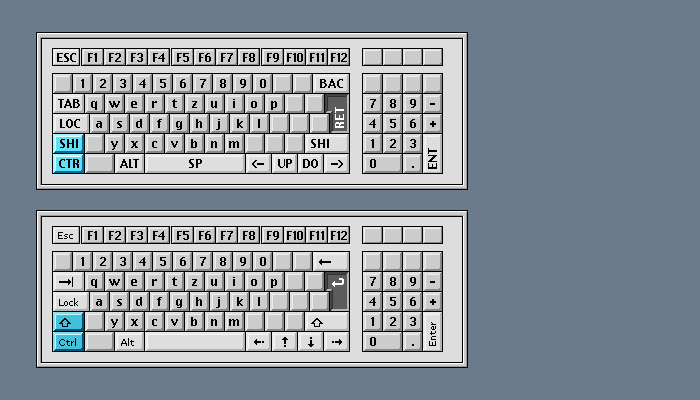
• The following examples illustrate the syntax of PowerCoach Keyboard Command description and the corresponding user actions to execute the command on each computer platform.
• To execute this Keyboard Command on Windows computers:
[CTR] [SHI] + [RET] ...means "Type RETURN key" while you "hold down CTRL key" and "hold down SHIFT key".
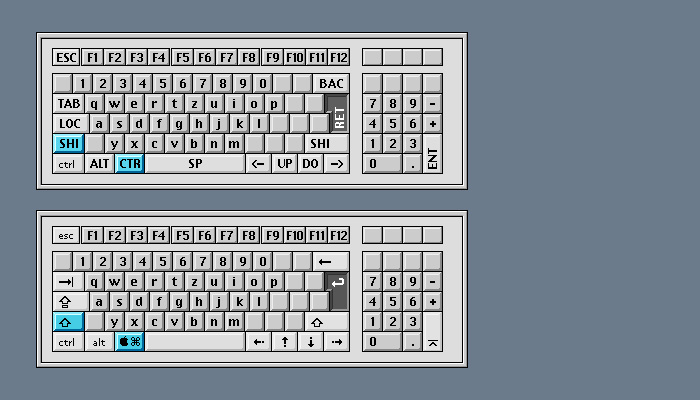
• To execute this Keyboard Command on Mac OS computers:
[CTR] [SHI] + [RET] ...means "Type RETURN key" while you "hold down COMMAND key" and "hold down SHIFT key".
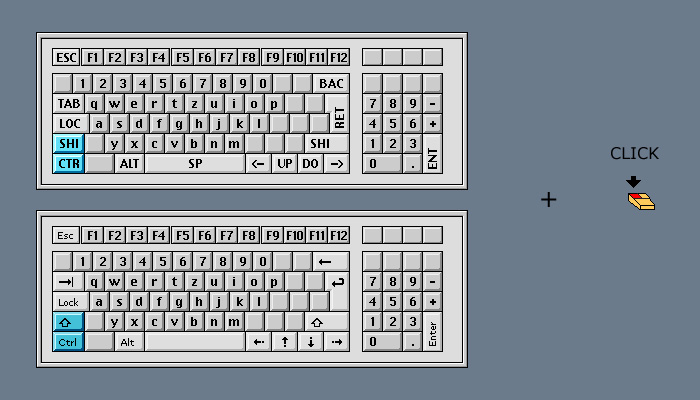
• The following examples illustrate the syntax of PowerCoach Mouse Command description and the corresponding user actions to execute the command on each computer platform.
• To execute this Mouse Command on Windows computers:
[CTR] [SHI] + [*] ...means "Execute a CLICK" while you "hold down CTRL key" and "hold down SHIFT key".
• To execute this Mouse Command on Mac OS computers:
[CTR] [SHI] + [*] ...means "Execute a CLICK" while you "hold down COMMAND key" and "hold down SHIFT key".
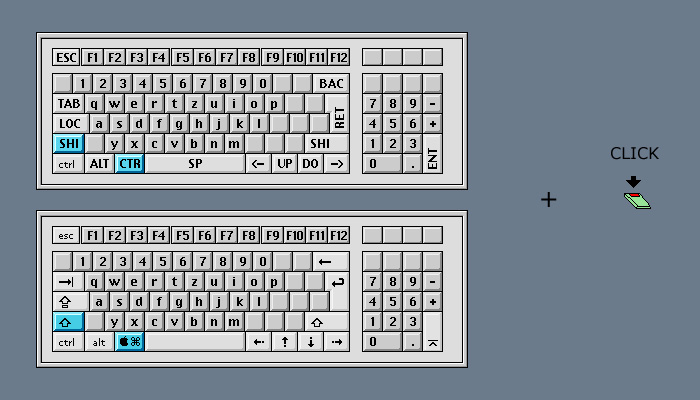
In this documentation, the respective symbols for Special keys or Common keys are used to describe Keyboard Commands, for examples:
[A] ...means "Type A key".
[RET] ...means "Type RETURN key".
[<-] ...means "Type LEFT ARROW key".
• To execute a Mouse Command, you act on objects using the mouse.
In this documentation, the respective symbols for Mouse actions are used to describe Mouse Commands:
[*] ...means "Execute a CLICK".
[**] ...means "Execute a DOUBLE CLICK".
[R*] ...means "Execute a RIGHT CLICK" on Windows computers.
...means "Execute a CONTROL CLICK" on Mac OS computers.
• To execute some commands, you must activate or deactivate SHIFT LOCK.
In this documentation, the [LOC] symbol is used if a command requires activated SHIFT LOCK, for examples:
[LOC] + [*] ...means "Execute a CLICK" when "SHIFT LOCK is activated".
[LOC] + [->] ...means "Type RIGHT ARROW key" when "SHIFT LOCK is activated".
[LOC] + [UP] ...means "Type UP ARROW key" when "SHIFT LOCK is activated".
NOTE: If a command requires activated SHIFT LOCK, the [LOC] symbol is the first element of the command description (separated of Key or Mouse symbol by the "+" sign).
• To execute certain commands, you must simultaneously press and hold down one or several Modifier keys while typing a key or executing a mouse action.
In this documentation, the respective symbols for Modifier keys are used if a command requires such keys, for examples:
[SHI] + [*] ...means "Execute a CLICK" while you "hold down SHIFT key".
[LOC] [SHI] + [*] ...means "Execute a CLICK" when "SHIFT LOCK is activated" and while you "hold down SHIFT key".
[CTR] [SHI] + [RET] ...means "Type RETURN key" while you "hold down CTRL key" and "hold down SHIFT key" on Windows computers.
...means "Type RETURN key" while you "hold down COMMAND key" and "hold down SHIFT key" on Mac OS computers.
NOTE: Symbols for Modifier keys are listed at the beginning of command descriptions (after the [LOC] symbol and separated of Key or Mouse symbol by the "+" sign).
• To execute certain commands, you may use optional Multipliers.
In this documentation, the [MULT] symbol is used if a command allows Multipliers, for examples:
[<-] + [MULT] ...means "Type LEFT ARROW key" and "use optional Multipliers".
[UP] + [MULT] ...means "Type UP ARROW key" and "use optional Multipliers".
[*] + [MULT] ...means "Execute a CLICK" and "use optional Multipliers".
NOTE: If a command allows Multipliers, the [MULT] symbol is the last element of the command description (separated of Key or Mouse symbol by the "+" sign).
• The following examples illustrate the syntax of PowerCoach Keyboard Command description and the corresponding user actions to execute the command on each computer platform.
• To execute this Keyboard Command on Windows computers:
[CTR] [SHI] + [RET] ...means "Type RETURN key" while you "hold down CTRL key" and "hold down SHIFT key".
• To execute this Keyboard Command on Mac OS computers:
[CTR] [SHI] + [RET] ...means "Type RETURN key" while you "hold down COMMAND key" and "hold down SHIFT key".
• The following examples illustrate the syntax of PowerCoach Mouse Command description and the corresponding user actions to execute the command on each computer platform.
• To execute this Mouse Command on Windows computers:
[CTR] [SHI] + [*] ...means "Execute a CLICK" while you "hold down CTRL key" and "hold down SHIFT key".
• To execute this Mouse Command on Mac OS computers:
[CTR] [SHI] + [*] ...means "Execute a CLICK" while you "hold down COMMAND key" and "hold down SHIFT key".
| e |
| e |